
Android preview in development
Let your people
ring through.
Quiet the number patterns you recognize. Keep the callers you want. See why every screened call was handled.
For Android 10 and later. Downloads aren’t public yet.
What happens
to this call?
Start with one rule: silence area code 833. Then give the caller an exception and watch the decision change.
10 digits use US/Canada. Include +country code for international numbers.
Blockt’s decision
The call stays visible in your dialer without ringing. Voicemail follows your carrier’s settings.
An explanation you can read, and a rule you can change.
Illustrative demo. No calls are placed. The number you type stays in this page; it isn’t saved or sent. Private and hidden numbers cannot be screened by this Android API.
Your rule.
A clear reason.
An easy correction.
Call screening should feel understandable. Blockt keeps the decision close to the rule that made it.
- Start with the pattern
- Choose an area code, prefix, country calling code, toll-free group, “contains,” or wildcard pattern. Set each rule to silence or reject. Your rules stay local.
- Keep a number welcome
- Saved contacts bypass Blockt. Your manual allow list takes priority over every rule and signal, so an exception stays an exception.
- See what happened
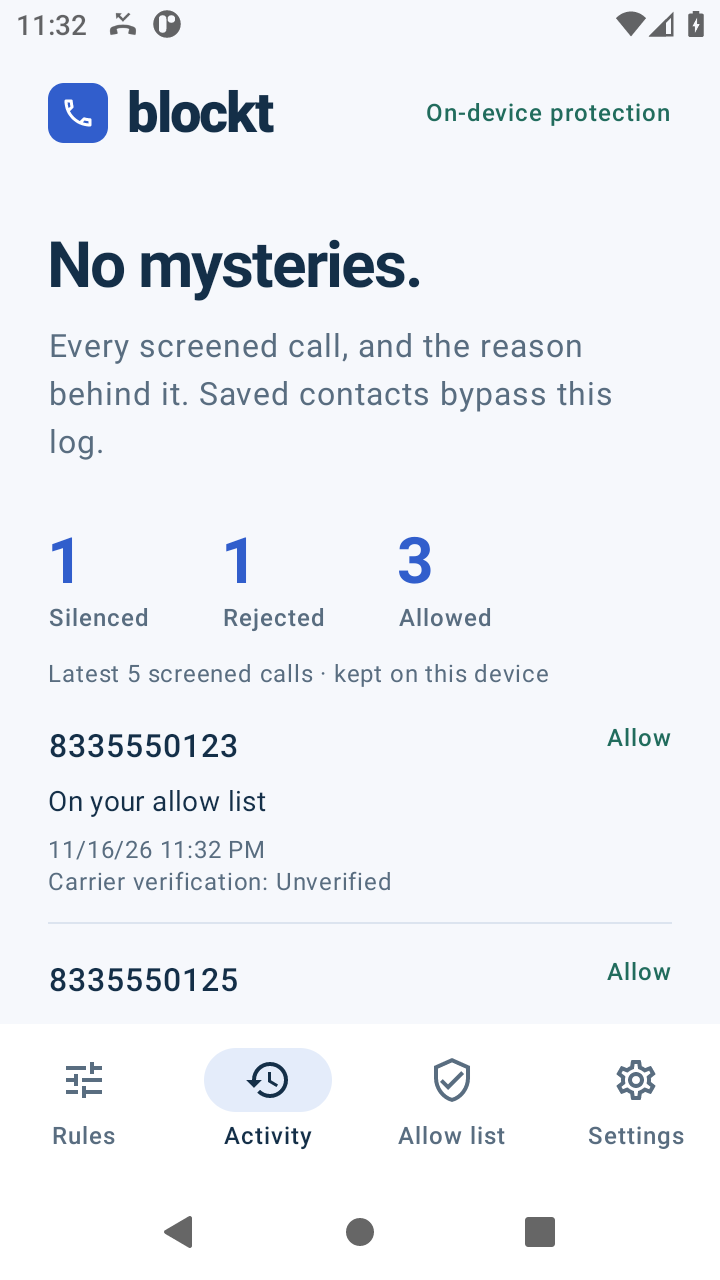
- Activity keeps the latest 1,000 screened calls with a time, action, carrier verification result, and reason. Allow a number or turn off the matching rule from the log.
- Choose your signals
- Optional rules can use failed carrier verification, a number that shares your US/Canada area code and exchange, or repeated calls from the same number. A pattern is a clue, not proof of spam. “Unverified” stays neutral.
Private means
staying on your phone.
The current app has no internet permission. No address book upload, analytics SDK, advertising, or cloud account.
Your rules, settings, allow list, and screened-call activity live in the app’s private storage. Automatic cloud backup is disabled.
Read the privacy detailsA few things
to know.
Android does the screening handoff. Here’s what that makes possible, and where the limits are.
Does Blockt replace my phone app?
No. You keep your dialer and voicemail. You choose Blockt as Android’s caller ID & spam app once, through a system dialog. Android supports one call-screening app at a time, so choosing Blockt replaces the app currently holding that role.
Can it block my contacts or private numbers?
Blockt does not request contacts access, so Android bypasses it for saved contacts. Your manual allow list also wins over every Blockt rule. Private, hidden, unavailable, and other numbers Android does not expose to the screening service bypass Blockt too.
What’s the difference between silence and reject?
Silence stops the ringtone while keeping the call visible in your dialer. Whether it reaches voicemail depends on your carrier’s settings. Reject declines the call as if you declined it yourself. Neither action promises a particular busy or disconnected-number tone. Both remain visible in Blockt’s activity.
Will it recognize every spoofed call?
No. Android 11 and later can provide a carrier verification result, when the network has one. A failed result is an optional signal. “Unverified” tells us nothing about whether a number is authentic, and a passed result does not make a caller trustworthy. A matching area code and exchange is a pattern, not proof of spoofing.
What if screening can’t make a decision?
The preview allows a call if it cannot read its local state or screening takes too long. Ambiguous and malformed numbers are allowed for safety. Screening resumes after the phone’s first unlock following a restart.
Can I install it now?
Blockt has a working Android 10+ preview under development. Downloads are private while it is being tested. It is not currently listed on Google Play, and there is no public download on this website.
A working preview, still taking shape
A quieter line starts
with a rule you understand.
Calls first. No SMS filtering, subscriptions, or server-side answering in the current preview.